Greater Vancouver, BC
EIT · EGBC

Lambert
Badong

Mechanical Design Engineer, EIT · AI Workflow Builder

I design switchgear by day, and build AI-powered tools that remove the busywork from engineering, small business, and everyday life.

Balloon key
click to zoom
MAIN
HMI · L1 L2 L3
METER
FDR-1
FDR-2
FDR-3
DIST
144.0040.0090.00
FEATURE TREE● LIVE
Switchboard_Lineup.SLDASM
Section_1 · Main1
Section_2 · Bus2
Section_3 · Feeders3
Section_4 · Dist4
Lifting eyes5
Main bus (Cu)
Mates (24)
RENDER · REALVIEW
click a balloon
1FoxFab Engineering VaultA personal knowledge base that gives my AI agents their context.Read ↓
auto-orbit on
5
projects
1,600+
auto-linked part notes
18
screens in a daycare app
~6,200
lines of Python in a household bot
About

About me

Degree

I have a B.A.Sc. in Mechatronic Systems Engineering from Simon Fraser University (’24), where I learned to work across mechanical, electrical and software design. For my capstone, I was integration lead on Cane-9, a robotic navigation companion that helps people with visual impairments find their way through indoor spaces like malls and grocery stores. I built its directional haptic feedback and machine-learning object identification, and modelled the handle and body in SolidWorks.

Now

Today I’m a Mechanical Design Engineer at a switchgear manufacturer in Greater Vancouver. I design switchboard enclosures and control panels in SolidWorks and AutoCAD, from copper bus sizing and bracing to Kirk key interlocks. I build them to UL 891, UL 1008 and NEMA standards, and I produce the BOMs and fabrication drawings that take each job to the shop floor. I’m a registered EIT with EGBC, working toward my P.Eng in 2029.

AI

AI is my force multiplier. When a task is repetitive, I turn it into a tool. At work, that became the Engineering Tool Hub, which cuts non-design job overhead by 89–94%, and a personal knowledge vault that gives my Claude Code agents their working memory. At home, it’s Daybook for my family’s daycare and Kobe Bot for our household. Every tool is built to be automated, auditable, and actually used.

Based in
Greater Vancouver, BC
Education
B.A.Sc. Mechatronic Systems Engineering, SFU (’24)
Licence
EIT (EGBC) → P.Eng 2029
AI toolkit
Claude & Claude Code
Main builder: backend coding, plus the vault and Tool Hub skills. Built Daybook and Kobe Bot.
Copilot
Repo upkeep on GitHub, and the model behind OpenClaw.
ChatGPT (Codex)
Second auditor: reviews and double-checks Claude Code’s work.
OpenClawExtends Kobe Bot with extra agent skills, powered by Copilot.
AI agentsmulti-step, tool-using workflows
Projects

Five builds. Two at work, three at home.

HMI · L1 L2 L3
SEC 1
SECTION A–A
SECTION VIEW · A–A
main bus · Cu
breakers
cable lugs
section plane
At the office · 01–02

Where switchboards get designed.

Two tools that strip the busywork out of every switchgear job.

1Knowledge Management · AI WorkflowIn daily production use

FoxFab Engineering Vault

A personal engineering knowledge base in Obsidian that doubles as working memory for my Claude Code agents.

Problem→

Engineering know-how lived in people’s heads, scattered spreadsheets and CAD folders. Finding a good reference job, or every job that used a part, meant digging through folders and asking whoever remembered.

Build→

An Obsidian vault where Claude Code does the filing. “New job…” reads the release form and starts the job note; “I finished…” reads the BOM, links every part and compares it with the reference job. A Python watcher logs each new SolidWorks file to the day’s note.

Result

Since April 2026: 75+ jobs, 1,700+ auto-linked part notes and 550+ CAD events logged. Every job moves through one pipeline (Imported → Model Check → Drawing Check → Done), and every AI step is auditable.
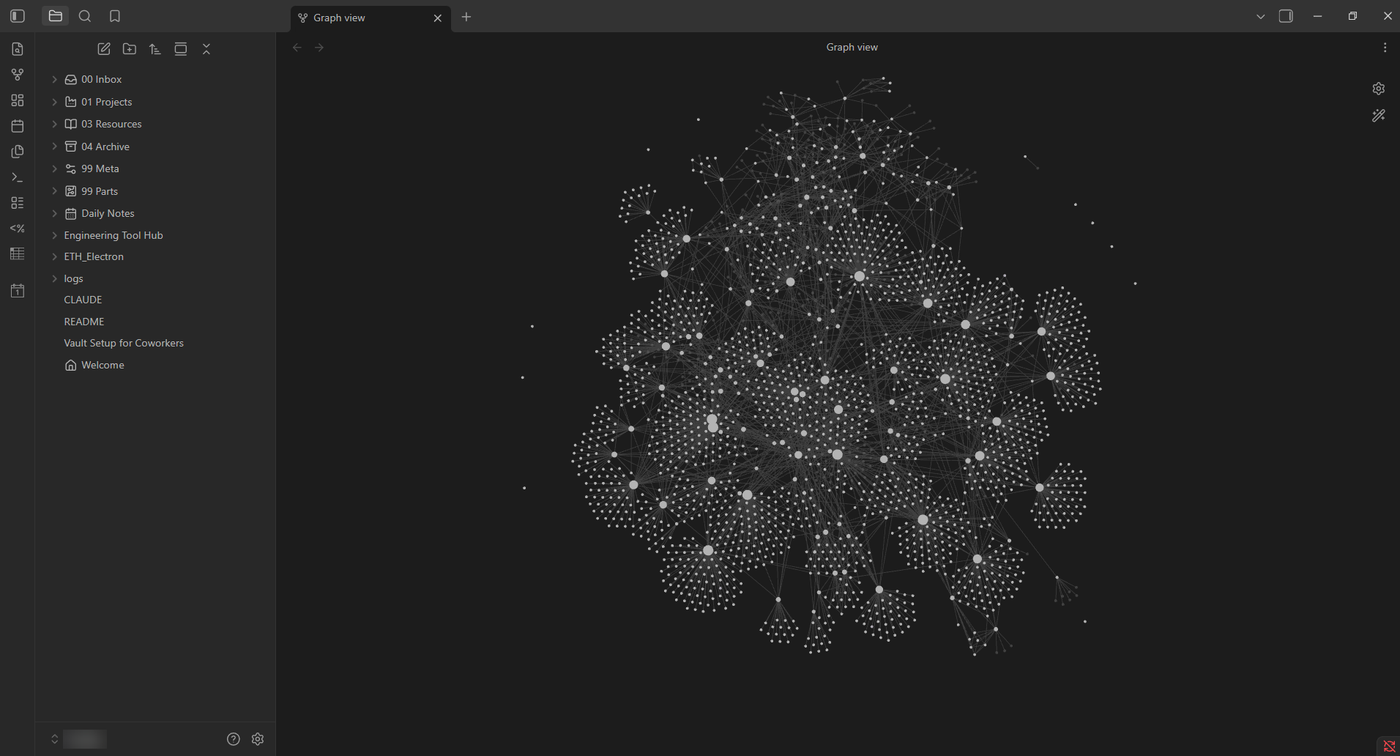
Graph view · jobs, parts and days as one linked webclick to enlarge ↗
Obsidian graph view of the engineering vault: job, part and daily notes linked into one network
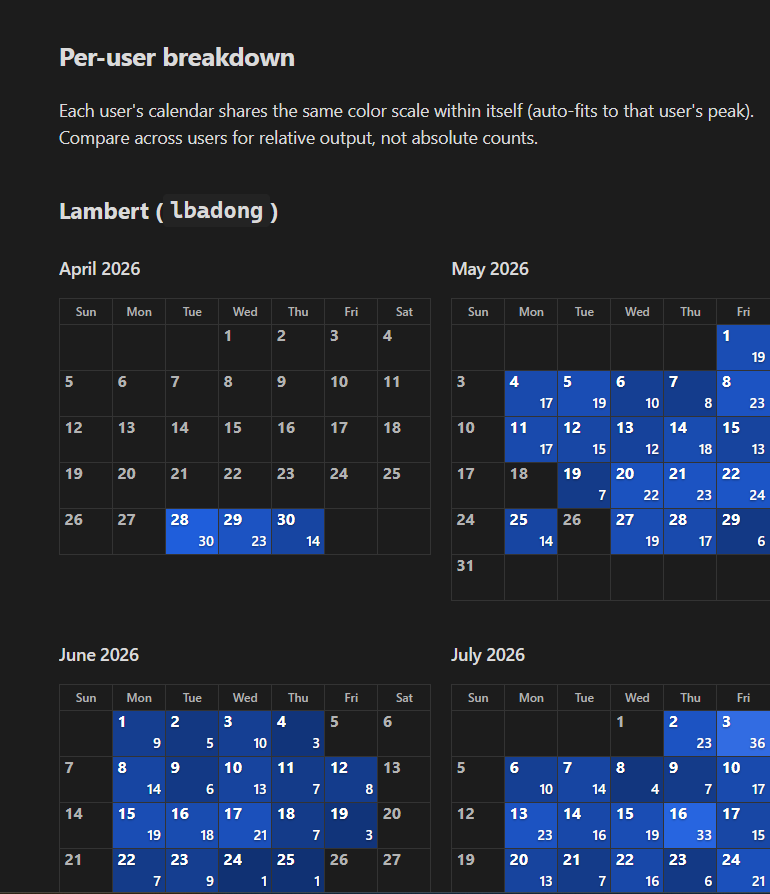
Activity calendar · logged work per dayclick to enlarge ↗
Activity calendar dashboard showing logged work entries per day, April to July 2026
What’s a second brain?

A notes system that remembers for me, and for the AI agents I work with. Instead of knowledge sitting in someone’s head or a folder nobody opens, every job, every part and every workday becomes a note, and the notes link to each other. Over time those links build a map of how the work fits together, and you can ask it questions:

  • Which past jobs used this part?
  • What changed between this job and its reference job?
  • What did I work on this week?
Since Apr 2026
75+
jobs tracked
1,290+
agent actions logged
550+
CAD events auto-logged
1,850+
timestamped log entries
87
lessons in agent memory
How the vault works
1
Structure
PARA folders: jobs, engineering reference, one note per part, daily notes, templates.
2
Job intake
“New job …” — Claude Code reads the release form, fills the job note, links the reference job.
3
Job finish
“I finished …” — Claude reads the BOM, links every part, diffs it against the reference job.
4
Live CAD monitor
A Python watcher logs every new SolidWorks file to the day’s note, every 10 s.
5
Audit & sync
Every AI task is logged to dashboards; the vault syncs via PowerShell and Git.
AI agents at work · Claude Code
Plain-language commands → multi-step agent runs, every step logged.
Step 1 · Read
Reads release forms and BOMs
Tech
ObsidianDataviewTemplaterClaude CodeAI agentsPythonPowerShellSolidWorks VBAGit
2Engineering Automation · Desktop AppIn production · v3.6

Engineering Tool Hub

Type a job number once — the hub does the BOMs, revisions, exports and printing.

Problem→

Every switchgear job came with hours of non-design overhead: building BOMs by hand, updating revisions, exporting DXFs and PDFs, and printing the shop packet. A 50-part job carried about 4.5 hours of it, on top of the actual design.

Build→

A Python desktop app with a native C# SolidWorks add-in. Type a job number once and it finds reference jobs, generates the BOM, runs revisions, and exports and prints everything. Archive-first guardrails and 400+ automated tests back each of its 48 releases.

Result

A 50-part job now carries about 25 minutes of overhead, 89–94% less. That’s projected at 500–1,000 hours a year on a four-designer sample, with zero new software licences. All 10 designers on the team now use it.

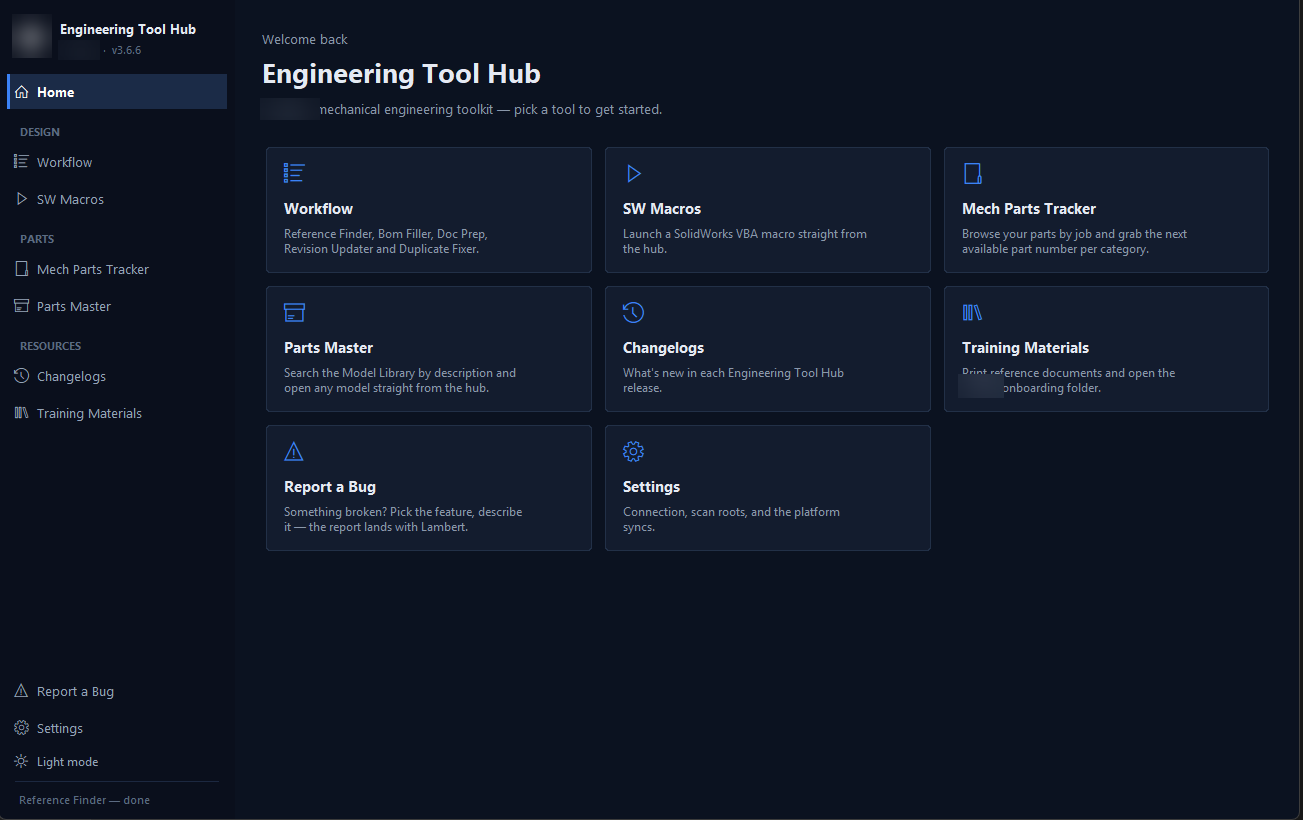
Home · every tool one click awayclick to enlarge ↗
Engineering Tool Hub home screen with Workflow, SW Macros, Mech Parts Tracker, Parts Master and other tool cards
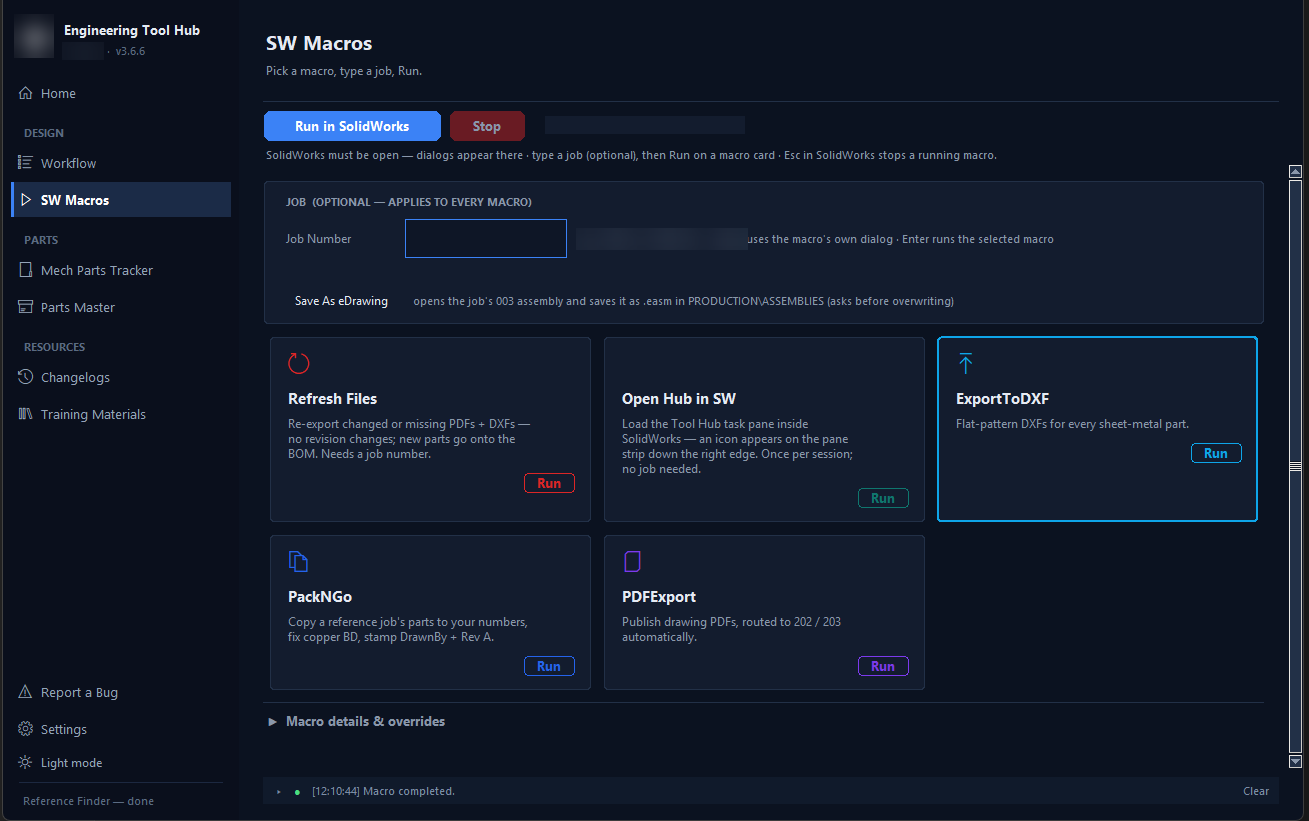
SW Macros · type a job, press Runclick to enlarge ↗
Engineering Tool Hub SW Macros screen with Refresh Files, Export to DXF, PackNGo and PDF Export macro cards
89–94%
per-job overhead cut
500–1,000 h
per year, projected (4 designers)
400+
automated tests
48
releases, v1.0 → v3.6
Overhead per job · excl. design
25-part job
~3 h → ~20 min
50-part job
~4.5 h → ~25 min
120+ part job
~9 h → ~30 min
Timed tools · before → after
#
Tool
Before → after
Time left (click a row)
Gain
Supporting tools
08
Duplicate Fixer
Renumbers a duplicated part end-to-end
09
Mech Parts Tracker
Next free part number, collision-checked
10
Parts Master
Searchable ~3,500-model library
11
Refresh Files / Save as eDrawing
Keeps PDFs/DXFs synced; shop eDrawings
12
Training, Changelog, Report-a-Bug, Settings
Onboarding, release notes, bug reports
How it works
  • Python / Tkinter desktop app plus a native C# SolidWorks add-in; auto-updating .exe.
  • Drives SolidWorks (COM API + VBA macros), Excel and Acrobat.
  • Guardrails: archive-first, pre-flight and CAD↔BOM checks, final audit.
  • Claude Code skills mirror the tools from the command line.

Employer-proprietary — showcase only. Zero new software licences.

Tech
PythonTkinterPyInstallerSolidWorks API (COM)C# (SolidWorks add-in)VBAExcel (xlwings)Acrobat COMPyMuPDFpytestClaude Code skills
At home · 03–05

Where the side projects live.

Same habit: find the repetitive part, then build a tool for it.

HOME · CUTAWAY
laptop · Daybook dashboard
3Desktop Appv0.1.7 · for small daycares

Daybook DMS

Offline, encrypted daycare software — built for my family’s centre, a good fit for small daycares.

Daybook app iconDashboard · demo data
Daybook dashboard screen

Started as the admin system for Smart Thinkers Childcare Centre in Vancouver. The Windows edition suits other small daycares.

8
releases
111
commits
22
data models
33/33
checks passed, 10-year sim
How it works
  • Next.js + React in Electron — installer, auto-updates.
  • Encrypted SQLite (Prisma); data stays on the centre’s PC.
  • AES-256-GCM backups with a recovery code.
  • Built iteratively with Claude Code.
Daybook attendance screen (demo data)
Attendance
Daybook billing screen (demo data)
Billing
Daybook payroll screen (demo data)
Payroll
Daybook analytics screen (demo data)
Analytics
Daybook compliance screen (demo data)
Compliance
Key features
DashboardChild profilesSmart attendanceInvoicing & overdueBC subsidy trackingAllergy-aware mealsIncident reportsWaitlistStaff clock & ratiosBC payroll engineCompliance exportsParent announcements
Tech
Next.js 16React 19TypeScriptTailwindElectronSQLitePrismaAES-256-GCMClaude Code
4Automation · Discord BotIn daily use

Kobe Bot

A Discord bot that turns casual chat into an organized household.

How a message becomes a record · example
01 · Chat→
Someone types in a themed channel
# expenses
you Costco $85
02 · Parse→
Plain text becomes a structured record
{
 item: “Costco”
 amount: 85.00
 category: auto
}
03 · Store→
Saved to SQLite; totals recalculated
INSERT INTO expenses
→ balances
→ who owes who
04 · Pin
The channel’s living card updates itself
📌 pinned · expenses
Costco   $85.00
balance updated ✓

Same path for chores, recipes, rental listings and key dates. Alongside it, a scraper pulls listings, recipes and local events, and a scheduler sends the morning briefing, bill reminders and PDF reports to Google Drive.

Type “Costco $85” or drop a listing link in a channel — Kobe Bot parses it, stores it and updates live pinned cards.

20
modules
~18
database tables
10+
feature areas
Features
Expense splittingChoresRecipes → groceriesRental scraperBill remindersDocument filing!ask!datenight!tripPDF reports
How it works
  • discord.py UI: persistent buttons, dropdowns, forms.
  • Natural-language parsing into SQLite records.
  • Three-tier scraper: stealth browser → proxy API → HTTP.
  • Morning briefings and PDF reports to Google Drive.
Tech
Python 3.11discord.pySQLitePlaywrightBeautifulSoupReportLabGoogle Drive APIClaude Code
5Voice AI · HardwareWork in progress

Project KOBE

A voice-first AI layer over my desk: wake word, always-on HUD, apps, music and 3D printer.

Work in progress. The software for all seven phases is written and smoke-tested with stand-in devices. Still to do: a trained “Hey KOBE” wake word and a real driver for the holographic display.

“Hey KOBE” — it listens, reasons with Claude, acts, speaks back and shows status on a HUD. Destructive actions always ask first.

Pipeline
Mic
Wake word
Speech-to-text
Router
Claude
Actions
TTS
HUD
Roadmap
PHASE 1
Voice MVP
PHASE 2
HUD
PHASE 3
Integrations
PHASE 4
Screen vision
PHASE 5
Hand gestures
PHASE 6
Polish
PHASE 7
Holographic display
Tech
PythonOpenWakeWordfaster-whisperClaudeElevenLabs TTSMediaPipeFastAPI + WebSocket HUD
Skills

Toolbox.

CAD & Mechanical
SolidWorks & SolidWorks APIAutoCADFusion 360BluebeamGD&TSheet metalDFMFEAPrototyping
Electrical & Standards
Switchgear designPower distributionSingle-line diagramsTransfer switches (ATS/MTS)Generator connectionsUL 891UL 1008NEMACSA
Code & Apps
PythonC#C++VBAMATLAB & SimulinkTypeScriptNext.js / ReactElectronSQLite / PrismaDiscord.pyPlaywright
Dev Tools
VS CodeCLI / terminalPowerShellGit & GitHub (gh CLI)
AI Toolkit
Claude / Claude CodeCopilotChatGPTOpenClawAI agents
Knowledge & Project Mgmt
Obsidian (Dataview, Templater)Design-to-order workflowsCross-functional collaborationWrikeJira
Contact

Have busywork that should be a tool?

Switchgear design, engineering automation or a small-business AI workflow — let’s talk.